Career Center at Ballantyne Ridge High School

*Start this process with plenty of time.
*It can take CPCC up to 25 business days to verify your application before you can sign up for courses - skipping any steps will elongate this timeline.
*If you are currently a Sophomore, you will begin these steps in April to begin classes your first semester (Fall) of Junior year.
CMS and CPCC are not the same entity - students enrolling in Dual Enrollment with CPCC are considered ADULTS under FERPA and CMS is not informed of anything (if they finished the application, if they registered correctly, if they cannot log into their account, if they have missing assignments, etc.) except for the courses they have registered for and their final grades.
Any and all questions related to CPCC's timeline, if they've received an application, changing of a password or username, an issue with a course, etc. have to be directed to CPCC at ccp@cpcc.edu from your personal email address or your CPCC email address - tech issues can be solved in live-time with CPCC's chat feature (see Step Four #14 for the link)

Dual Enrollment - When students are enrolled in two places - one being the high school (BRHS), the other being a community college (CPCC).
The purpose of dual-enrollment with CPCC is for high school Juniors and Seniors to earn college credits while they are still in high school OR to take courses that may not transfer to college but will prepare them for the workplace. Some benefits include:
- free tuition
- flexible course offerings (online and in-person options)
- AP credit towards your high school GPA without the AP exam
- exposure to college-level coursework and college-level expectations
DUAL ENROLLMENT IS NOT THE SAME AS EARLY COLLEGE! Early College is a completely different HIGH SCHOOL in CMS that is on CPCC's campus and would mean you no longer attend Ballantyne Ridge at all.
Dual Enrollment can also be called College and Career Promise (CCP) - they are synonyms.
Step One: Eligibility - Can You Take Courses?
Before getting started, please note the following:
- students CANNOT replace CPCC courses with graduation requirements at the high school except for HIS 131+HIS 132 for the American History graduation requirement (which Pathway to choose to be able to do this is under Step Three)
- students CANNOT take CPCC Math to replace Math 4 at BRHS - they must take Math 4 at BRHS
- students MUST have transportation to leave campus if they are taking CPCC courses on their 4-block schedule at the high school (for example, you cannot put a CPCC class as one of your 4 blocks and go to the Media Center to work on it) <-- this doesn't mean you have to go to CPCC and take the course in-person, it just means that you cannot be on campus at the high school unless you have a high school class on your schedule during that time
- students CAN have the option to have late arrival or early release if they are taking CPCC classes and their CPCC classes are replacing elective(s) at BRHS (this will be determined by your Counselor)
- students MUST have at least a 2.8 unweighted GPA to take classes on the College Transfer Pathways (see below)
Step Two: After Graduation - Are You Going to College, or Are You Beginning Your Career?
If you are planning on going to work after high school, you will choose a CTE Pathway
*not all of these require an unweighted 2.8 GPA - these Pathways do not have a GPA requirement, but the classes will NOT transfer to a college
**if the classes say "Transfer," they will transfer to college, all other classes are leading you to a certification for the workplace (for example: Welding, Automotive, etc.)
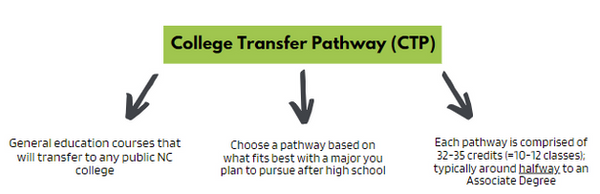
If you are planning on going to college after high school, you will choose a College Transfer Pathway (CTP)
*all of these require at least a 2.8 unweighted GPA
**all of these courses will transfer to every public college in NC (if you are planning on going to a college out of state, reference the commonly asked questions at the bottom of this page)

If you are unsure, choose one of each! You can choose:
One (1) CTP Pathway or Two (2) CTE Pathways or One (1) CTP Pathway and (1) CTE Pathway
Step Three: Pick Your CTE / CTP Pathway(s)
CTP (College Transfer Pathways) here
All CTP (College Transfer Pathways) require a minimum of a 2.8 unweighted GPA. Go to Infinite Campus - Documents - Transcript to check your Unweighted GPA.
Most CTE Pathways require a 2.8 minimum GPA, but not all. The list of CTE Pathways that do not require a 2.8 are here -->
*Remember, all of these courses on all of the Pathways are General Education courses - they will be required for the first 2 years of your college career, no matter your major, and will feel a lot like high school classes. You will not get into courses associated with your college major until the last 2 years of college.
**If you are wanting to take HIS 131 and HIS 132 to fulfill the American History graduation requirement for the high school, you MUST ENROLL in the Associate in Arts Pathway or you will be unable to take those courses.
CTE Pathways here
*not all of these require an unweighted 2.8 GPA - these Pathways do not have a GPA requirement, but the classes will NOT transfer to a college
If you are unsure, choose one of each!
You can choose: One (1) CTP Pathway or Two (2) CTE Pathways or One (1) CTP Pathway and (1) CTE Pathway
Step Four: Apply to CPCC for Dual Enrollment as a New Student
This is where directions need to be paid attention to very carefully. These steps are comprehensive, if you do not read all of them, your application will not be complete and you will be unable to register for courses.
BEGINNING THE APPLICATION:
1. Click here to begin the application process
2. Select "New Student Application"
3. Select "New Students (never taken a course at Central Piedmont)
4. Fill out the necessary fields to Create an Account - ensure you are using a PERSONAL EMAIL and a password that you will absolutely remember
*your CMS email will reject any emails from CPCC - you must use a personal email account instead
5. You will receive a verification code to the email you provided - enter that verification code when you are prompted to do so - the code will only be active for 10 minutes
6. Click the Application that you have already started - it will show that you have already completed 63% of it
FILLING OUT THE APPLICATION:
7. On the left-hand side of the application, make sure you are completing the FullApp (not the SnapApp)
8. Enrollment Information Tab:
+ "Will you still be in high school while attending Central Piedmont's college credit courses" YES
+ "Which high school program are you interested in?" DUAL ENROLLMENT
+ "When would you like to start?" CHOOSE SEMESTER YOU WILL START COURSES
+ "Is this your first time in college?" YES
*you may have AP credits that count for college credits, but you did not attend college to earn those credits
+ Choose Your Dual Enrollment Pathway(s): see Step Three to choose
*College Transfer Pathways start with the word "Transfer" on the drop down menu
9. Tell Us About Yourself Tab:
You only have to answer the questions that have a star* next to them - you do not have to put your Social Security #
10. Academic History Tab:
+ "What is the highest level of education that you completed?" This is not the grade you are currently in, this is the last grade you FINISHED (so, if you are currently a Junior, the last grade you completed was 10th grade)
+ "What is your NC Public School Number" this is your CMS number ID
+ "Last High School Attended" this is Ballantyne Ridge High School - if it does not pop up on the Search option, here is the information:
School Type: High School
CEEB Code: 370297
Name: Ballantyne Ridge High School
Country: United States
Address: 4004 Toringdon Way Charlotte, NC 28277
City: Charlotte
State: North Carolina
County: Mecklenburg
+ Upload your transcript
*go to your Infinite Campus - Documents - Transcript
11. Parental Information Tab:
+ Complete this according to your parents' education level, this does not have to be exact, it is okay to guess
12. Emergency Contact Tab:
+ Complete this according to who you would like to be your emergency contact
13. Confirm Your Eligibility Tab:
+ "High School Contact Information"
Official First Name: Shannon
Official Last Name: Minick
Official Email: shannonm.minick@cms.k12.nc.us
14. Click Submit to complete - after submitting, it will take 2-5 business days for you to receive your login information (sent to your personal email) to be able to complete Step Five (below)
*never received anything? Contact CPCC Tech Help here and use the Chat feature in the lower right hand corner
Step Five: Logging into Your Account + Setting up Authenticator + Completing Checkpoint Course
15. Once your application is approved (remember: this can take 2-5 business days), you will receive an email from CPCC to your personal email address that has your CPCC Email and Username
*if your email given to you is sminick01@email.cpcc.edu, your username is sminick01
**never received anything? Contact CPCC Tech Help here and use the Chat feature in the lower right hand corner
16. Set up Microsoft Authenticator by following these instructions
+ Scroll down to Setting Up the Microsoft Authenticator App
+ Make sure you are following the instructions to begin the process on a computer, and then continuing the process on your phone when prompted
17. Enroll in the CCP Checkpoint Course in Brightspace by following these instructions
*you will be unable to register for courses until this course is completed and you pass the Final Quiz in Unit 9 with an 80%
18. Complete the CPCC Dual Enrollment Contract here
*YOU WILL NOT BE IN THE SYSTEM UNTIL THIS STEP IS COMPLETE! This contract goes directly to me - once received, you will receive an email from me that you can move onto Step Six (below)
Step Six: Planning For and Registering For Courses
*this is the trickiest part of the registration process with CPCC, please ensure you are reading all directions in their entirety
BEFORE YOU BEGIN: It may take up to 25 days for CPCC to process your information - right now, you are PLANNING your courses - once your information is processed by CPCC, you will be able to REGISTER for those courses.
PART I:
19. Go to my mycollege.cpcc.edu and Log In with your CPCC email address and password you created
20. Click "Student Planning" and then "Plan Your Degree and Register for Classes"
21. Click the arrows where the semester is and make sure it says the semester you want to sign up for (Summer 2026, Fall 2026, etc.)
22. In the right hand corner where it says "Search for Courses," type the class that you are looking for and push enter
*Not sure what class you want? Go back to step 3 and look at your Pathway! These are your class choices. Example: ENG 111, PSY 150, MAT 171, etc.
**If you Register for a class not on your Pathway, CPCC will drop it for you and you will be removed from the course
23. On the left hand side of the screen, you will see Filters, make sure you select the following:
- Open Sections Only (this will remove classes that are already full)
- The term you are searching for (Fall 2025, Spring 2026, etc.)
- Online Only (this means your classes will only be online)
*If this step is not followed correctly, you could accidentally sign up for an in-person class or a class in the wrong semester
24. Scroll back up to the top of the screen where you will see your class (with the filters now applied) and click on “View Sections of _____” - this is a blue banner
-
-
If you selected "Online" in the filters, all the sections of the class you are looking for will be online-only
-
Make sure the class has open spots!
-
"12/25" = there are 12 spots open in the 25-person clas
-
Read through the options, choose the one that works best for you, and click “Add Section to Schedule” *do not choose classes with a lock symbol, you will not be able to Register for those*
-
-
25. Click "Add Section to Schedule"
PART II:
26. Once you have added the section you want, on the left hand side of the screen, click the Graduation Hat symbol then “Student Planning”
27. Click “Plan and Schedule” - make sure the term at the top is the term you are checking
You can look at the current term, or the future term that you just added a class to
28. Click the blue button that says “Register Now”
**if there is not a "Register Now" button, or the "Register Now" button is grey and you cannot click it, or there are Red Notifications in the corner about "Residency Status," "Continuing Education," "Talk to a Counselor," etc. this means:
- Your application and transcript have not been processed by CPCC yet - keep checking every day until the Register Now button is blue
- CPCC will also email your CPCC email account letting you know when you can Register for your classes (when the Register Now button has turned blue)
**In all of these cases, you will need to log back in by going to mycollege.cpcc.edu - Log In - Student Planning - Plan Your Degree and Register for Classes - click the "Register Now" button when it turns blue*
29. Check that you are registered for the course by ensuring the class now says "Registered" with a green banner
Remember: PLANNED courses have a yellow banner, REGISTERED courses have a green banner and a check mark
*Bookmark this page for current students. It allows you to access:
- Email = this is the only way anyone at CPCC will communicate with you, including Instructors
- Brightspace = this is CPCC's version of Canvas and will be where you complete your work
*your classes will not show up in Brightspace until the day they begin!
- MyCollege = this is where you plan and register for classes
- MyConnect = where you can schedule tutoring, free essay editing, or chat with a tech specialist
It is very important that you read the syllabus provided by your Instructors and understand the Drop / Add / Withdrawal policies for each course.
Need Help with Brightspace? Click here.
Need Help Logging In / Changing Your Password? Chat with IT here.
Need Help With Step 6? Make an appointment with Ms. Minick here
Step Seven: Registration Complete and Next Steps
Commonly Asked Questions
"Do these classes count on my high school transcript? What if I have taken, or am taking AP classes? What about IB?"
Yes! The courses you take with CPCC will show on your high school transcript, and, if they are worth 3+ credit hours (all courses on the College Transfer Pathways are), then they count the same as an AP class (on the 5.0 scale). In order to ensure you are NOT REPEATING CLASSES between your AP credits towards college and your CPCC class credits towards college, check this guideline. If you have earned a college class from an AP exam, you CANNOT take that same class with CPCC.
For example, if you take AP Psych with BRHS and earn a 4 on the AP Exam, you earn college credit for PSY 150: General Psychology. You would not want to sign up for PSY 150 with CPCC because you already have credit for it from your AP exam.
In order to ensure you are NOT REPEATING CLASSES between your AP credits towards college and your CPCC class credits towards college, check this guideline. If you have earned a college class from an AP exam, you CANNOT take that same class with CPCC. Check how your IB scores count as CPCC classes using this guideline.
If you need to have credit for a class in order to take the next level of that class (for example, you cannot take ENG 112 without taking ENG 111 first), you will need to send CPCC your CollegeBoard AP scores.
-
For example, "I took AP Lang and got a 3 on the AP exam, this means I earn credit for ENG 111. I do not want to take ENG 111 with CPCC because then I would be repeating a credit I already earned from the AP class, so, I can send my CollegeBoard score report showing that I earned a 3 on the AP Lang exam. This will mean I receive credit for ENG 111 so I can sign up for the next level of English, ENG 112."
"I remember doing classes during COVID online, and I did not do well. Most of the CPCC classes are online. How can I receive help if I need it?"
Although your courses will probably be online (especially while you are a Junior), you have the option of going in person if you are eligible to have early release at the high school (ask your counselor!). However, if you decide to do fully online courses, you will still have an Instructor that grades your assignments, provides feedback, and has office hours for you to attend on Microsoft Teams or in person.
CPCC also offers an array of student services that are completely free! This includes:
-
Make an appointment with an in-person Tutor using Tutor Match.
-
Make an appointment with a Brainfuse tutor for live chat options after hours using Live Help.
-
Submit a paper for writing assistance.
-
Access a Tutor on Microsoft Teams with a virtual session.
"How many classes can I take with CPCC? What about my 4 classes at the high school?"
Number of CPCC Classes Allowed:
--> Fall semester - 2 classes (3 with Counselor and CDC approval via email - student emails their counselor and Ms. Minick)
--> Spring semester - 2 classes (3 with Counselor and CDC approval via email - student emails their counselor and Ms. Minick)
--> Summer semester - 4 classes (5+ with Counselor and CDC approval via email - student emails their counselor and Ms. Minick)
*A maximum of 8 classes from CPCC will be added to the BRHS transcript, however, you can take more than 8 classes with CPCC, they just will not factor into your high school GPA
**Your registration card with your Counselor will have 8 classes on it that will all take place at BRHS. If you have completed your graduation requirements, you can put CPCC classes in place of electives and then you may either have late arrival or early release.
***You may not stay on campus during a "CPCC Class" block on your schedule.
****All graduation requirements must be taken with BRHS except for American History which is HIS 131 and HIS 132 with CPCC
*****Juniors can only have late arrival or early release for ONE BLOCK - Seniors may have it for TWO BLOCKS. All students must take at least 2 courses at BRHS every semester.
"I am already in Dual Enrollment and need to make a pathway change, add a new pathway to my current one, send my transcript for the new semester, or I am changing high schools - where can I do any of those things?
You can do ALL of those things on this website :)
"I want to study Business / Accounting / Finance / etc. but I don't see any of those classes on the College Transfer Pathway. Why not?
As stated in the instructions, College Transfer Pathways are made up of the General Education Courses that ALL college students (all states, all schools, all majors) have to take in their first 2 years.
The Pathways vary in what you are allowed to take (look at them), but they are all the same genre of courses (Social Sciences, English, Science, etc.) and are required to complete regardless of what you end up majoring in.
If you want classes specific to what you want to major in, and you want to make sure they transfer to college, you can look at CTE Pathways which are more specific and ensure that it says on the Pathway that a particular class Transfers to colleges. CTP Pathways - all classes transfer to college. CTE Pathways - only specific classes transfer to college (it will state on the pathway if it transfers or not).
Remember, you can always choose 1 CTP Pathway, and 1 CTE Pathway to choose courses from.
"If I find out I do not have the time needed to complete my dual-enrollment classes, can I just drop them?"
If a student is going to drop a dual-enrollment course, it must be done within the 10% CPCC drop/add period. This date will be discussed by your Instructor and will be on the syllabus.
This will result in the course not appearing on either transcript.
Any withdrawal after the CPCC 10% designated drop/add period will be recorded as a WF (Withdraw Failing). The WF will appear on the student’s transcript, but will not affect the GPA.
"What about my high school schedule?"
There are multiple ways to approach this. You can either have your dual-enrollment classes as "5th and 6th blocks" meaning they are not a part of your high school day in terms of your schedule (you will complete the courses on your own time outside of the school day), but they still count on your high school transcript. Or, you can replace electives at the high school with dual-enrollment classes. In order to choose this option, you have to leave campus during the blocks that are dedicated to dual-enrollment (early release or late arrival). Meaning, you have to have transportation and cannot stay on campus. This will be determined by you and your Counselor. Juniors can do this for 1 block during the day, Seniors can do it for 2.
Remember, CPCC classes are college classes - college classes are NOT counted the same as high school, meaning they DO count the same as AP courses with respect to your GPA (on the 5.0 scale) but have nothing to do with your high school graduation requirements (except for American History - info on this is on Step Three). You cannot replace BRHS classes with CPCC classes until you have completed all of your graduation requirements because CPCC classes will count as electives. If you have not completed all of your graduation requirements, your CPCC classes will be apart of your transcript, but not apart of your day at the high school and will be completed on your own time.
"Is the grading the same as high school?
No, it is not. Here is how your grades at CPCC will be on your high school transcript
CPCC Grade = Grade on HS transcript
A = 95
B = 85
C = 75
D = 65
F = 55
I = 55*
W = WF**
WF = 0***
*If a student receives an incomplete for a course, the grade will revert to a (55-F) if course requirements are not met within ten days.
**If a student is going to drop a CCP course, it must be done within the 10% CPCC drop/add period. This will result in the course not appearing on either transcript. Any withdrawal after the CPCC 10% designated drop/add period will be recorded as a WF (Withdraw Failing). The WF will appear on the student’s transcript but will not affect the GPA.
***If a student does not withdraw and never attends, they will receive a 0.
****The following numeric grade conversions are based on NC DPI recommendations. A grade of WP (Withdraw-Passing) will be issued at the discretion of the CMS principal. Reasons can include, but are not limited to: medical, extreme hardship, and student’s family relocating.
"I want to take CPCC courses with dual-enrollment to help my GPA and for exposure to college classes, but I am planning on going to college out-of-state / planning on attending a private college. Will CPCC courses transfer there?
CPCC courses are guaranteed to transfer to ALL public NC colleges. Most CPCC will NOT transfer to private NC colleges (Duke, Elon, etc.). You will need to look up your colleges you are applying to in order to determine if they are public or private. There is very rarely a reason to attend a Private college unless you are receiving a substantial scholarship - they are significantly more expensive.
If you are looking at out-of-state colleges (make sure you are VERY careful with this option - there is rarely a need to attend an out of state school with regard to the cost - out of state colleges can be up to 3x more expensive than in-state colleges), you can do two things: contact their admissions department and send them a screenshot of your Pathway asking them what classes from the Pathway will transfer to their college. Or, on most college websites, you can determine what credits transfer to them yourself. You will Google search your college with the following prompt (I will use Alabama as an example): "university of Alabama transfer equivalency online portal" - click the link for transfer equivalency, then choose your transfer institution (this will be Central Piedmont Community College) and follow the prompts. Some college websites make this more difficult than others, so take your time!